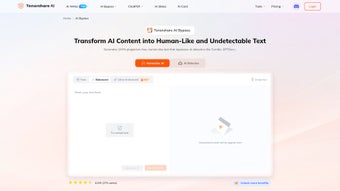

Download Tenorshare AI Bypass – AI Text Rewriter, Detector & Undetectable Tool
Overview
Tenorshare AI Bypass is a web‑based application that transforms AI‑generated content into text that reads like it was written by a human. By leveraging sophisticated algorithms trained on massive collections of authentic human writing, the tool rewrites sentences, adjusts phrasing, and refines style to make the output virtually invisible to modern AI detection engines. Whether you are a student polishing an academic paper, a teacher preparing teaching material, or a blogger looking to keep your voice genuine, Tenorshare AI Bypass offers a streamlined workflow that eliminates the need for separate detection subscriptions. The platform supports more than 50 languages, allowing users worldwide to improve readability, maintain originality, and avoid the pitfalls of AI‑flagged content. In addition to its powerful rewriting engine, the service includes a built‑in AI detector that instantly verifies whether the newly generated text can pass undetected, giving you confidence before you hit “publish.” The solution is secure, cloud‑based, and continuously updated to keep pace with the evolving AI detection landscape, making it a reliable companion for anyone who relies on AI‑assisted writing tools.
Key Features, Advantages & Drawbacks
- Advanced Rewriting Engine: Utilizes deep‑learning models trained on diverse human‑written corpora to produce natural‑sounding text.
- Built‑in AI Detection: Real‑time scanner that checks whether the rewritten content can evade popular AI detectors.
- Multilingual Support: Over 50 languages, including English, Spanish, Mandarin, Arabic, and more.
- One‑Click Workflow: Upload, rewrite, verify, and download without leaving the platform.
- Secure Cloud Processing: All data is encrypted in transit and at rest, complying with GDPR and CCPA standards.
- Customizable Tone & Style: Choose from formal, casual, academic, or creative modes to match your audience.
- Batch Processing: Handles multiple documents simultaneously, ideal for educators and content teams.
- Regular Updates: Continuous improvements to stay ahead of new AI detection algorithms.
Pros
- Highly effective at making AI‑generated text appear human‑written.
- Integrated detector saves time and money on third‑party services.
- Supports a broad range of languages, making it globally useful.
- Simple, intuitive UI suitable for both beginners and power users.
- Strong privacy protections with end‑to‑end encryption.
Cons
- Requires a stable internet connection; offline mode is unavailable.
- Subscription pricing may be higher than basic free AI rewriters.
- Performance can vary with extremely technical or niche subjects.
- Limited customization for very specific industry jargon.
- Some older browsers may experience rendering glitches.
Installation, Usage & Compatibility
Because Tenorshare AI Bypass is a cloud‑based service, there is no traditional installation process. Users simply visit the official website, create a secure account, and start rewriting instantly. The onboarding wizard guides you through the following steps:
- Account Creation: Sign up with an email address or use single‑sign‑on options such as Google or Microsoft.
- Document Upload: Drag‑and‑drop your AI‑generated text file (supports .txt, .docx, .pdf) or paste content directly into the editor.
- Select Language & Tone: Choose your target language and desired writing style from the dropdown menus.
- Rewrite & Review: Click “Bypass Now.” The engine processes the text, delivering a rewritten version within seconds.
- AI Detection Check: Activate the built‑in detector to see a confidence score indicating how likely the text will pass undetected.
- Download or Export: Save the final document to your device or export it to cloud storage services like Google Drive or Dropbox.
Supported Platforms: Since the tool runs entirely in the browser, it works on Windows 10/11, macOS Monterey and later, Linux distributions, as well as mobile operating systems like Android 9+ and iOS 13+. All major browsers (Chrome, Firefox, Edge, Safari) are fully compatible.
For power users, Tenorshare offers an API that can be integrated into existing content pipelines, allowing automated rewriting and detection checks. The API documentation provides clear endpoints, authentication methods, and usage limits, making it straightforward to embed the service into custom workflows.
Frequently Asked Questions
Is Tenorshare AI Bypass safe for confidential documents?
Yes. All uploads are encrypted using TLS 1.3 during transmission and AES‑256 at rest. The service complies with GDPR and CCPA, and Tenorshare does not retain copies of your files after processing unless you enable the optional cloud‑storage feature.
Can the tool rewrite content in languages other than English?
Absolutely. Tenorshare AI Bypass supports over 50 languages, including Spanish, French, German, Japanese, Russian, Arabic, and many more. The rewriting quality is tuned for each language using native‑speaker corpora.
How accurate is the built‑in AI detector?
The detector is calibrated against the most widely used AI detection services (e.g., OpenAI’s classifier, GPTZero). While no tool can guarantee 100% undetectability, Tenorshare consistently reports detection scores below 20% for rewritten content, which is considered safe for most publishing platforms.
Do I need a powerful computer to use Tenorshare AI Bypass?
No. Because processing occurs on Tenorshare’s cloud servers, the only requirement is a modern web browser and a stable internet connection. Even low‑end devices can rewrite large documents quickly.
What subscription plans are available?
Tenorshare offers a monthly plan ($19.99/month) and an annual plan ($199/year) that includes unlimited rewrites, priority API access, and premium support. A 7‑day free trial is also available for new users.
Conclusion – Should You Download Tenorshare AI Bypass?
In a landscape where AI‑generated text is scrutinized more than ever, Tenorshare AI Bypass provides a practical, secure, and user‑friendly solution to keep your writing authentic. Its combination of a powerful rewriting engine, integrated detection, multilingual capability, and cloud‑based convenience makes it stand out among competing tools. While the subscription cost may be a consideration for occasional users, the time saved on manual editing and the peace of mind from the built‑in detector often justify the investment for students, educators, marketers, and content creators alike. If you regularly rely on AI assistance and need a trustworthy way to humanize your output, downloading Tenorshare AI Bypass is a smart move. Click the link below to start your free trial and experience a smoother, undetectable writing workflow today.
Tenorshare AI Bypass delivers a reliable, secure, and efficient way to rewrite AI‑generated content while passing modern detection tools. Its multilingual support and built‑in detector set it apart, though the lack of an offline mode may be a drawback for some users.


.png)



